Securing WordPress Admin Access: Two-Factor Authentication and IP-Based Restrictions
Securing access to a WordPress administration panel is no longer optional.
Even strong passwords are insufficient against brute-force attacks, credential leaks, and automated scanning tools.
This article describes how I secured the administration area of my WordPress portfolio by combining two-factor authentication (2FA) with IP-based access restrictions at the web server level, focusing on practical and effective security measures.
Technical Environment
The WordPress portfolio is hosted on a Linux server with the following configuration:
- SSH access via MobaXterm
- NGINX as the web server
- MariaDB as the database engine
- WordPress installed manually
- Wordfence plugin for security and 2FA
Security note
Adminer.php was used temporarily for database management and then removed.
Exposing a database administration tool through the web interface represents a serious security risk.
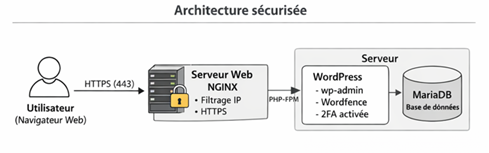
- User → NGINX → WordPress → MariaDB
- HTTPS
- IP filtering at NGINX level
- 2FA enforced on WordPress admin
This architecture shows that security is applied before WordPress processes any request.
Two-Factor Authentication (2FA) for WordPress
Two-factor authentication adds an essential security layer by requiring:
- A username and password
- A time-based authentication code generated by a trusted device
This prevents access even if the primary credentials are compromised.
Implementation steps
- Installed the Wordfence security plugin
- Enabled 2FA for the administrator account
- Verified access using password + authentication code
- wp-login.php
- Wordfence verification
- Valid code → access granted
- Invalid code → access denied
This diagram highlights how 2FA protects the admin interface from credential theft.
🌐 IP-Based Access Restriction with NGINX
To further reduce the attack surface, access to the WordPress administration area is restricted to explicitly authorized IP addresses.
This filtering is handled directly by NGINX, meaning unauthorized requests are blocked before WordPress is executed.
Example NGINX configuration
location ^~ /wp-admin {
allow 203.0.113.45; # Authorized IP
allow 198.51.100.22; # Authorized IP
deny all;
}
location = /wp-login.php {
allow 203.0.113.45;
allow 198.51.100.22;
deny all;
}
Any request from an unauthorized IP address receives an immediate 403 Forbidden response.
- Authorized IP → wp-admin accessible
- Unauthorized IP → access denied
This measure effectively blocks brute-force attempts and automated scans.
Securing SSH Access
Server administration access is also protected.
SSH connections are restricted to trusted locations, preventing unauthorized remote access to the system.
Only authorized IP addresses are allowed to initiate SSH sessions using MobaXterm.
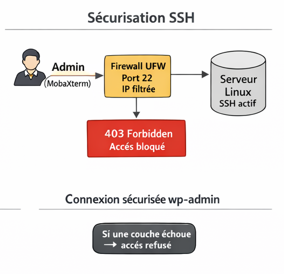
- Administrator → SSH service
- Authorized IP → connection allowed
- Unauthorized IP → connection refused
Protecting SSH access is critical, as it provides full control over the server.
Defense in Depth: Securing wp-admin
The WordPress administration interface is protected using a layered security approach.
Each layer must be successfully validated before access is granted.
Security layers applied
- IP-based filtering at the NGINX level
- Username and password authentication
- Two-factor authentication via Wordfence
- Access to wp-admin
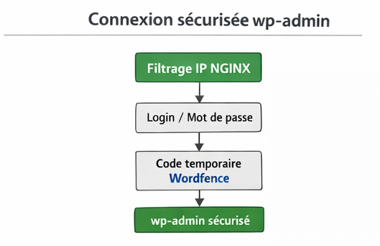
Failure at any layer results in access denial
This defense-in-depth strategy significantly reduces the impact of a single security failure.
Security Considerations and Limitations
While this setup provides strong protection, it does not eliminate all risks.
Identified limitations
- 2FA does not protect against vulnerabilities in outdated or insecure plugins
- IP-based restrictions may be inconvenient with dynamic IPs or VPN usage
- Security relies on continuous maintenance and updates
Possible improvements
- Hardware-based security keys (U2F / WebAuthn)
- Centralized logging and monitoring
- Regular security audits of WordPress plugins
- Automated off-site backups
Conclusion
By combining:
- Two-factor authentication
- IP-based access restrictions
- Manually installed WordPress with server-level controls
this setup provides a strong and realistic security baseline for a WordPress site exposed to the internet.
Security remains an ongoing process that requires monitoring, updates, and regular review.
No responses yet